

Best WooCommerce Review Plugins for Photo Reviews (2026): PVR Media Reviews, CusRev, VillaTheme, Yuko, ReviewX and the Official WooCommerce Plugin

We compared six WooCommerce photo review plugins — PVR Media Reviews, the official Marketplace plugin, VillaTheme free, Customer Reviews for WooCommerce, ReviewX and Yuko — on pricing, photo collection, display, SEO and data ownership to find the right visual review tool for every store.
Photo reviews — reviews with a real customer photo — sell better than plain text reviews. Research from Northwestern University found that products with customer photos get bought noticeably more often than products with text reviews alone. The problem: WooCommerce cannot ask for photos, reward customers for them or show them nicely on its own. You need a plugin. In this guide we compare six of them in plain language — with prices and honest downsides for each.
Here is the short version of who is who. PVR Media Reviews is the newest and most complete plugin, and you pay once. Photo Reviews for WooCommerce is the official plugin from the WooCommerce Marketplace — $29 a year. Customer Reviews for WooCommerce (CusRev) is the most popular free option. Yuko was built for shops moving away from Judge.me. Photo Reviews by VillaTheme is the budget pick with a cheap one-time upgrade. ReviewX lets customers rate several things at once, but photos need a paid plan. One warning before we start: there are two different plugins named "Photo Reviews for WooCommerce" — one from the official WooCommerce Marketplace, one from VillaTheme on WordPress.org. Different products, different companies, different prices.
📸 Why photo reviews work better than text
A five-star review makes a shopper feel a bit safer. A five-star review with a photo removes doubt: the buyer sees the product on a real desk, on a real person, in normal light — not in a studio render. For many visitors, that is the moment they decide to buy.
WooCommerce gives you basic text reviews with stars, and nothing else: no automatic "please leave a review" emails, no photo uploads, no way to reward customers with a discount. These six plugins fix that, each in its own way.
⚖️ The six plugins at a glance
The full scorecard is below — scores, prices and a one-line verdict for every plugin. We go through each plugin in detail after the table.

WooCommerce photo review plugins: head-to-head
Criteria scores from our testing methodology. Prices, plans and install counts are current as of September 2026.
| Tool | Score | Ease of use | Features | Performance | Pricing | Support & docs | Free plan | Open source | Verdict | Visit site |
|---|---|---|---|---|---|---|---|---|---|---|
| PVR Media Reviews | 9.5 | 9 | 8 | 8 | 8 | 6 | ✓ | ✓ | Best overall — photos and videos on your own site, a reviews hub for Google, $59 once | |
| Customer Reviews for WooCommerce | 8.8 | 8 | 7 | 8 | 6 | 7 | ✓ | ✓ | Best free option — photo reviews, coupons and Google Shopping feeds cost nothing | |
| Photo Reviews for WooCommerce | 8.6 | 9 | 8 | 8 | 9 | 8 | — | — | Best dedicated photo tool — cropping, five layouts, $29/yr | |
| Yuko | 8.0 | 9 | 8 | 8 | 8 | 8 | ✓ | — | Best Judge.me replacement — one-click import, phone-first forms, 8 widgets | |
| Photo Reviews for WooCommerce by VillaTheme | 7.8 | 8 | 7 | 7 | 9 | 7 | ✓ | ✓ | Cheapest start — photo reviews free, premium about $32 once | |
| ReviewX | 7.2 | 7 | 8 | 7 | 7 | 7 | ✓ | ✓ | Detailed ratings for quality, fit and value — photos need Pro; update to 2.3.11+ first |
📸 PVR Media Reviews — photos, videos and $59 once
🔗 See the live demodemo.pv-reviews.site — try the review form, gallery and reviews hub yourself
PVR Media Reviews is the newest plugin in this comparison — and the most complete. Its standout feature: large videos shrink inside the visitor's browser before upload. Big video files never reach your server in full size, so cheap hosting stays fast and you pay nothing for video processing. Photos and reviews are stored like normal WordPress comments — remove the plugin tomorrow and your reviews stay.
The free version is unusually generous: photo and video reviews, reviewer avatars with a crop tool, "helpful" votes, shop replies, a photo and video gallery with a pop-up view, star ratings in Google results, spam protection, and 7 languages out of the box.
The Pro version costs $59 once — no yearly fee. It adds the extras that turn reviews into traffic: a reviews hub page that gathers all reviews with filters by category and manufacturer (search engines love such pages), custom ratings like "quality, value, durability" per product, automatic reminder emails, discount coupons for reviews, a stats dashboard, and carousel and grid widgets.




Where PVR wins:
- Videos without extra load — videos shrink in the visitor's browser before upload, so even cheap hosting copes.
- Good for Google — the reviews hub page collects all reviews in one place that search engines can index.
- Your data stays yours — reviews live in your own database, nothing goes to someone else's cloud.
- Generous free version — photos, videos, votes, replies, stars in Google and spam protection cost nothing.
- Modern look — clean gallery, carousel and grid widgets, review pop-ups with a built-in video player.
Where PVR falls short: it launched in August 2026 — almost no public reviews and installs yet, and a single developer behind it. Treat it like any young software: keep backups. Reminders, coupons and widgets are only in the Pro version.
🏆 Photo Reviews for WooCommerce — the official $29/year plugin
Photo Reviews for WooCommerce by Xyno Tech is the official extension from the WooCommerce Marketplace. At $29 per year ($46.40 for two years) it covers the whole cycle: customers upload photos and videos with their review, the plugin crops images before showing them (free crop or fixed shapes: 1:1, 16:9, 4:3), and automatic emails chase customers who left text but forgot the photo.
Three kinds of emails go out on their own: a request after purchase, a reminder for customers who left text only, and a thank-you after a photo review. The coupon feature creates unique one-time discount codes for customers who add a photo — you pick the amount and the expiry date. In practice, this nudges many "text only" reviewers into adding a photo.
Five display styles come built in: the standard list (unchanged), a card grid, a minimal list, a "magazine" style where the newest review takes the full width, and a compact grid. Visitors can filter reviews by stars or "has photo" and vote the most helpful ones up.

Where it wins:
- Photo cropping — customers frame the photo before sending, so the gallery looks tidy, not random.
- Coupons for photos only — rewards photo reviews specifically, not just any review.
- Verified purchases — reviews are checked against real orders, so shoppers trust the photos.
- One settings panel — edit reviews, swap photos, change colors and layouts in one place.
Where it falls short: no free version, so you cannot try before paying. No questions-and-answers section, no reviews hub for Google, and no Google Shopping feeds (stars in search results come from WooCommerce itself). If you want the full review machine, CusRev does more — for free.
📬 Customer Reviews for WooCommerce — the free all-rounder
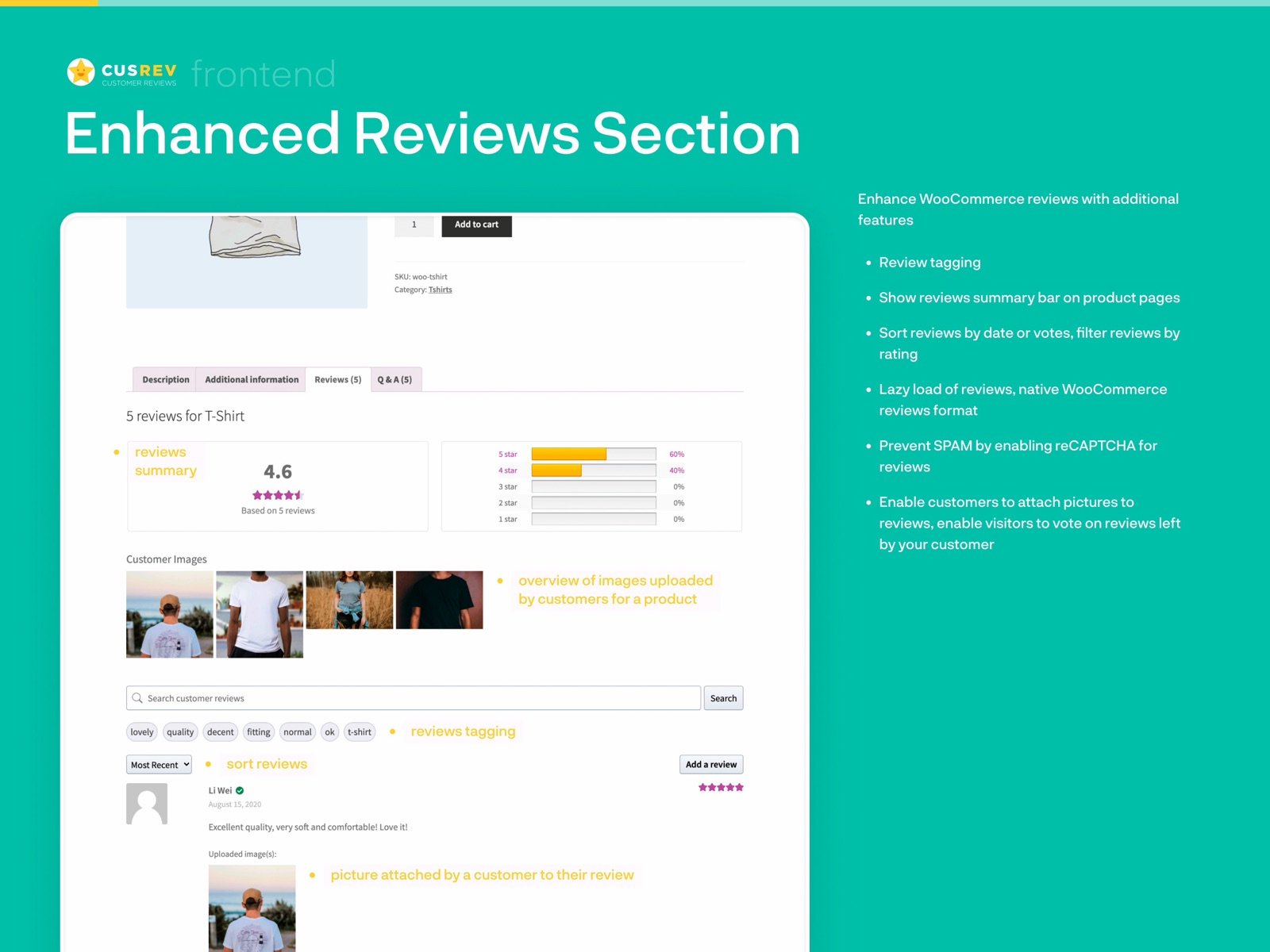
Customer Reviews for WooCommerce by CusRev is what WooCommerce's own review system should have been. The free plan has no limits: as many reminder emails as you want, photo and video reviews, reviews for the whole store (not just single products), discount coupons, moderation and public replies, trust badges, review votes, review search, and unsubscribe links.
Photos work simply: turn on image uploads in the settings, customers see an "Attach photos" button on the review form, and the photos show next to the review. You can even require a photo before the discount coupon is issued — a clean way to collect more pictures.
For Google it does more than most rivals: it creates product review feeds for Google Shopping free listings, adds star ratings to search results, and is translated into 36 languages. You can import and export reviews via CSV — including reviews from AliExpress or Etsy.
Where CusRev wins:
- Photo reviews on the free plan — image and video uploads included, no caps.
- Coupons for reviews — automatic discounts, including "photo required" rules.
- Your data stays in your database — uninstall the plugin and the reviews remain.
- Google Shopping feeds — the official Marketplace plugin does not do this.
Where CusRev falls short: no photo cropping — pictures show exactly as the customer took them, so the gallery looks uneven. Display layouts are plain: a simple grid instead of the nicer "magazine" or card styles. And reminder emails depend on your hosting's mail setup — on cheap hosting they can quietly fail without a proper mail service.
🔄 Yuko — for shops leaving Judge.me
Yuko was built for one specific event: Judge.me shut down its WooCommerce version in October 2025, and thousands of shops lost their review tool. Yuko's pitch is simple — import everything from Judge.me in one click (text, stars, photos, names, dates) and keep working without rebuilding anything.
Everything is made for phones: the customer gets an email after the order ships, taps the link, and leaves a review with photos straight from the phone camera — no account needed. Yuko says 78% of reviews come in from mobile. The Basic plan ($12/month) adds photo reviews, coupons and a review carousel.
Eight display widgets ship across the plans: a stars badge, a review grid, a review list, a carousel, a sidebar widget, a full "Wall of Love" reviews page, and a photo gallery on higher plans. Stars in Google results work out of the box. The Advanced plan ($30/month) adds verified badges, a Google Shopping feed, Klaviyo sync and support for several stores under one account.
Where Yuko wins:
- One-click import — from Judge.me, Yotpo or CSV; photos, ratings and dates survive, and the Yuko team helps with migration for free.
- Phone-first forms — a review takes under a minute on any phone, no login.
- Most display options here — 8 widgets, from a small stars badge to a full reviews page.
- Several stores under one account — with reviews shared across your shops.
Where Yuko falls short: your reviews live on Yuko's servers, not on your own site — if you ever leave, you need to export. The free plan has no photos at all; you need the $12 plan. And the company is young (launched late 2025), so betting your review history on it is a bigger leap than with CusRev's 80,000+ stores.
🆓 Photo Reviews by VillaTheme — the budget option
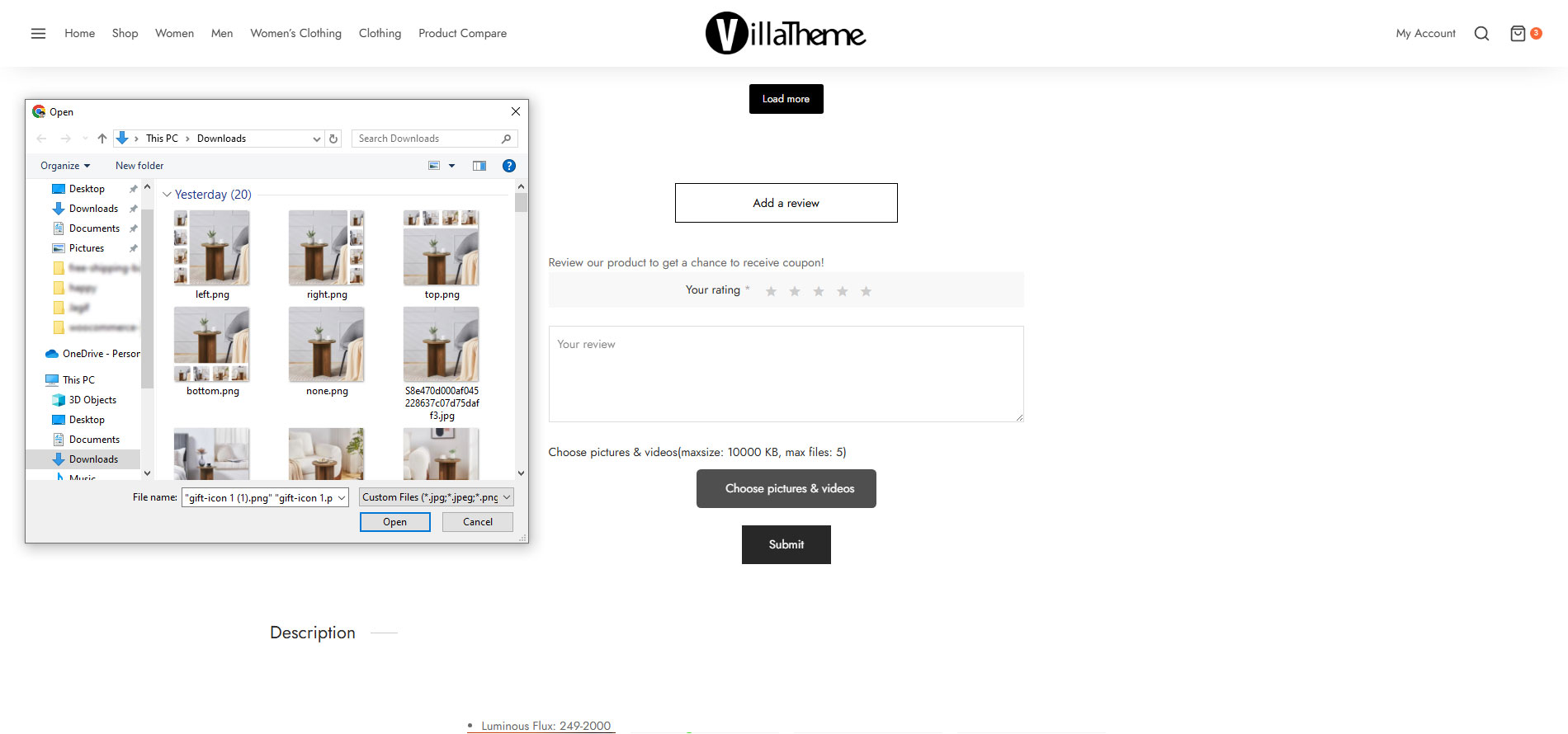
Photo Reviews for WooCommerce by VillaTheme is the original free photo review plugin, running on 10,000+ stores. The free version covers the basics: customers attach photos to reviews, you send reminder emails after delivery, the plugin generates unique coupons automatically (with a "photo required" option), and the review section shows a rating summary plus filters like "photo reviews only".
Display options in the free version are two styles — a plain list and a grid — with adjustable colors. A consent checkbox for public reviews (GDPR) is built in, and you can choose the sorting order and filter by stars.
The premium version costs about $32 once on CodeCanyon — no yearly fee. It removes the page reload when filtering, adds review titles, image folders, pop-up photo view and — the reason dropshippers buy it — import of reviews with photos straight from AliExpress by product ID, with filters and optional English translation.
Where VillaTheme wins:
- Zero cost for the basics — photos, reminders and coupons free, with no limits.
- AliExpress import (premium) — reviews with photos for dropshipping stores.
- One-time payment — the premium is ~$32 once, not a subscription.
- GDPR checkbox built in — in the free version, not locked behind premium.
Where VillaTheme falls short: only two basic layouts in the free version, simpler reminder emails than CusRev (fewer scheduling options), support through the WordPress.org forums can be slow, and video reviews are premium-only.
🎯 ReviewX — customers rate several things at once
ReviewX stands out with a different idea: instead of one star rating, customers rate several things separately — product quality, value for money, delivery speed — and can attach photos and videos. That gives you more detailed feedback and nicer rating bars on the product page. Photo uploads, though, are only in the Pro version.
The free version includes multi-criteria ratings (up to 3 criteria), reminder emails, verified badges, social sharing and widgets for the Elementor page builder. The Pro version at $47.40/month (or $79/year at the current promo price) adds photo and video reviews, stars in Google results, coupons, shop replies and spam protection.

Where ReviewX wins:
- Detailed ratings — customers rate quality, fit and value separately, with photos next to each — no other plugin here does this.
- Page builder widgets — works with Elementor, Divi and Oxygen out of the box.
- Social sharing — customers can share their review to social media in one click.
Where ReviewX falls short: photos need the paid plan — the free version collects no pictures at all. At $47.40/month it is the most expensive subscription in this comparison; the $79/year promo is the only sensible way in. The store base is small (7,000+ installs, 85 public reviews), and you must check the security update before trusting it with customer input.
🧭 Which plugin should you pick? Six scenarios
Scores are one thing; your situation is another. Here are the six most common cases:
❓ Frequently asked questions
🔎 Final verdict
Comments
Worth noting that VillaTheme's AliExpress import (premium) has a hard limit of 500 reviews per import, and the translated-to-English option sometimes produces awkward phrasing that looks spammy to shoppers. We import 100–150 reviews per product with the "include pictures only" filter and then hand-edit the top 10. The time investment pays off — products with curated imported photo reviews convert noticeably better than products with only text reviews from our own customers.
The ReviewX security note is not theoretical — we got hit by CVE-2026-57359 before patching. The vulnerability was exploitable via the review form on the front end, and we found injected scripts in three review submissions before our security scanner caught it. Update to 2.3.11 immediately if you run ReviewX. The patch is clean, but the fact that the REST endpoint accepted unauthenticated POST requests for months is concerning. For stores that cannot afford downtime, CusRev or the Marketplace plugin are safer bets from a security posture standpoint.
Running the official WooCommerce Marketplace plugin on two stores. The image cropping is genuinely useful — our product photos used to look inconsistent because customers uploaded wide landscape shots next to square close-ups. The 1:1 crop ratio fixed that overnight. One limitation: the plugin does not support video reviews, only photos. If you sell products where video demos matter (electronics, tools, kitchenware), you will need to pair it with CusRev for video or look at Yuko.
Switched from Judge.me to Yuko last week after the sunset email. The one-click import worked as advertised — all 1,200 reviews with photos came through. But one thing the article should mention: Yuko's free plan caps at 50 orders/month, and that includes orders from months ago if you are importing. We had to jump to the $12 Basic plan immediately because the import counted against the free tier. Not a dealbreaker, but plan for it.
One detail worth adding about CusRev: the coupon engine supports conditional rules, but the minimum order amount filter is per-coupon, not per-review-type. So if you set a 10% coupon for any review and a 15% coupon for photo reviews, both coupons can stack if a customer leaves two separate reviews. You need to set "single use per email" on both coupons and make sure the photo coupon has a higher minimum order amount to avoid accidental double-dipping. Learned this the hard way last month.